#>
မိတ္ေဆြတို႕လာေရာက္တဲ့အတြက္အထူးေက်းဇူးတင္လွ်က္ပါ

လိုအပ္တာရွာပါ

Jan 9, 2014

Blogger မ်ားအတြက္ မိမိတို႔ Blog မွာ ေနာက္ဆံုးတင္ထားတဲ႔ ပို႔စ္ေတြကို Slide Show ေလးနဲ႔ ေဖၚျပခ်င္ရင္


အျခား ႏိုင္ငံျခား ဆိုက္ဒ္ေတြမွာဆိုရင္ ဒီလို Slide Show ေလးေတြ လုပ္ထားတာ ေနရာ ေတာ္ေတာ္မ်ားမ်ားမွာ ေတြ႕ရပါတယ္.. ဒါ့ေၾကာင့္ အသံုးျပဳခ်င္တဲ႔ Blogger ညီကိုမ်ား မသိေသးတဲ႔ Blogger ညီကိုမ်ား အဆင္သင့္ သံုးလို႔ရေအာင္  ျပန္လည္မွ်ေဝေပးလိုက္ပါတယ္...။
မိမိတို႔ Blog မွာ ေနာက္ဆံုးတင္ထားတဲ႔ ပို႔စ္ေတြကို Slide Show ေလးနဲ႔ ေဖၚျပခ်င္ရင္ေတာ့ ေအာက္က အဆင့္အတုိုင္း ဝင္ပါ  ျပီးရင္ ဒီေအာက္က Box ထဲက ကုဒ္ေတြ ကို Copy ကူးျပီး  Add Gadget >> HTML/Java Script ကေနထည့္ေပးလိုက္ရံုပါပဲ ...။ လိုအပ္တဲ႔ အက်ဥ္း ၊ အက်ယ္ နဲ႔ အေရာင္ စ,တာေတြ ကိုေတာ့ အဆင္ေျပသလို ခ်ိန္ညွိေပးလိုက္ပါ... Template ထဲမွာ ဝင္ျပင္ေပးရတာ မဟုတ္လို႔ မွားမွာေၾကာက္စရာမလိုပါဘူး ရဲရဲသာ ကလိပါ မွားသြားရင္ ေနာက္တစ္ခါ ကုဒ္ေတြကို Copy  ကူးထည့္ေပးလိုက္ေပါ့ဗ်ာ...:)

1. Log in to  blogger account
2. Go to Design --> Page Elements --> Add Gadget
3. Choose HTML/Java Script
4. Copy the code below, and paste on it.

<script src="http://ajax.googleapis.com/ajax/libs/jquery/1.3.2/jquery.min.js" type="text/javascript"></script>
<style type="text/css" media="screen">
<!--

#spylist {
overflow:hidden;
margin-top:5px;
padding:0px 0px;
height:350px;
}
#spylist ul{
width:220px;
overflow:hidden;
list-style-type: none;
padding: 0px 0px;
margin:0px 0px;
}
#spylist li {
width:208px;
padding: 5px 5px;
margin:0px 0px 5px 0px;
list-style-type:none;
float:none;
height:70px;
overflow: hidden;
background:#fff url(http://i879.photobucket.com/albums/ab351/bloggerblogimage/blogger/post.jpg) repeat-x;
border:1px solid #ddd;
}

#spylist li a {
text-decoration:none;
color:#4B545B;
font-size:11px;
height:18px;
overflow:hidden;
margin:0px 0px;
padding:0px 0px 2px 0px;
}
#spylist li img {
float:left;
margin-right:5px;
background:#EFEFEF;
border:0;
}
.spydate{
overflow:hidden;
font-size:10px;
color:#0284C2;
padding:2px 0px;
margin:1px 0px 0px 0px;
height:15px;
font-family:Tahoma,Arial,verdana, sans-serif;
}

.spycomment{
overflow:hidden;
font-family:Tahoma,Arial,verdana, sans-serif;
font-size:10px;
color:#262B2F;
padding:0px 0px;
margin:0px 0px;
}

-->
</style>

<script language='JavaScript'>

imgr = new Array();

imgr[0] = "http://i43.tinypic.com/orpg0m.jpg";

imgr[1] = "http://i43.tinypic.com/orpg0m.jpg";

imgr[2] = "http://i43.tinypic.com/orpg0m.jpg";

imgr[3] = "http://i43.tinypic.com/orpg0m.jpg";

imgr[4] = "http://i43.tinypic.com/orpg0m.jpg";
showRandomImg = true;

boxwidth = 255;

cellspacing = 6;

borderColor = "#232c35";

bgTD = "#000000";

thumbwidth = 70;

thumbheight = 70;

fntsize = 12;

acolor = "#666";

aBold = true;

icon = " ";

text = "comments";

showPostDate = true;

summaryPost = 40;

summaryFontsize = 10;

summaryColor = "#666";

icon2 = " ";

numposts = 10;

home_page = "http://winkabarkyaw.blogspot.com/";

limitspy=4
intervalspy=4000

</script>

<div id="spylist">
<script src='http://scriptabufarhan.googlecode.com/svn/trunk/recentpostthumbspy-min.js' type='text/javascript'></script>
</div>


  အျပာေရာင္နဲ႔ ျပထားတဲ႔ ေနရာမွာ ဒီ rakhaingvyerla.blogspot.com အစား မိမိ တို႔ Blog လိပ္စာ ကိုအစားထိုးေပးပါ ..။

အားလံုးျပီးရင္ Save ကိုႏွိပ္ပါ ဒါပါပဲ ျပီးသြားပါျပီ...။
အားလံုးအဆင္ေျပၾကပါေစ....

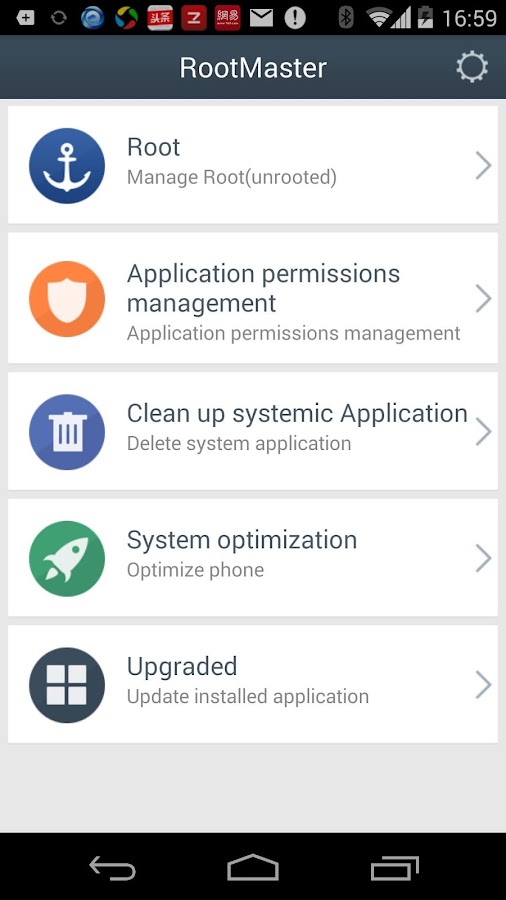
Android ဖုန္းအမ်ိဳးမ်ိဳးကုိ root လုပ္နုိင္တဲ့ VRoot for Android


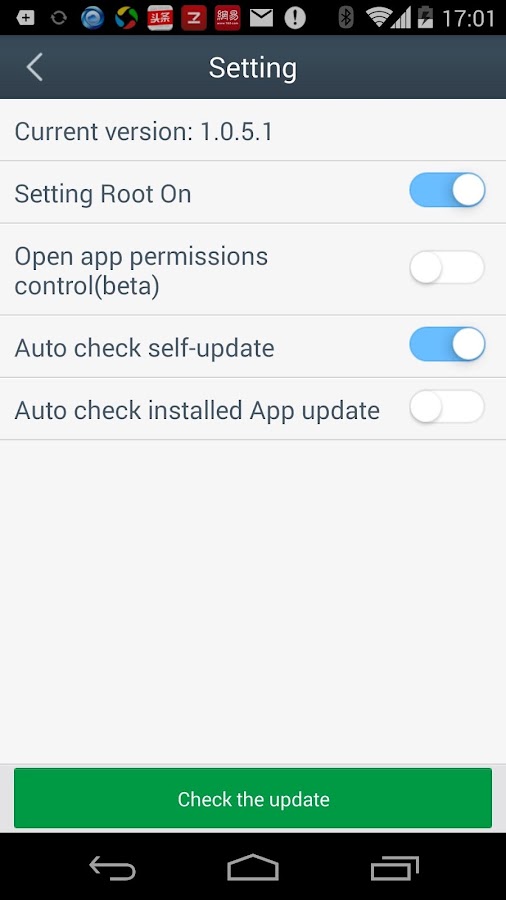
Android ဖုန္းအမ်ိဳးမ်ိဳးကုိ root လုပ္နုိင္တဲ့ VRoot လုိ႕ေခၚတဲ့ One Click root Tool ကုိေတာ့ ဖုန္းကလိသူတုိင္းသိၾကမွာပါ။ ကြန္ပ်ဴတာနဲ႕ဖုန္းနဲ႕ခ်ိတ္ဆက္ျပီး ဖုန္းကုိ Root လုပ္နုိင္တဲ့ Root tool ျဖစ္ပါတယ္။ အခုေတာ့ vRoot ေဆာ့၀ဲကုိုထုတ္လုပ္ထားတဲ့ Mgyun-Team ကေန Mobile application အေနနဲ႕ vRoot ေဆာ့၀ဲကုိထုတ္လုပ္လုိက္ပါျပီ ။ ဖုန္းေဆာ့၀ဲျဖစ္တာေၾကာင့္ ကြန္ပ်ဴတာမလုိဘဲ ဖုန္းထဲမွာတင္ မိမိဖုန္းကုိ root လုပ္နုိင္မွာပါ။ ရွိထားသင့္တဲ့ဖုန္းေဆာ့၀ဲေလးတစ္ခုပါပဲ။ vRoot 1.0.5.1 for Android ကုိေအာက္က Link မ်ားမွာရယူနုိင္ပါတယ္။
 
Download>>>Android ဖုန္းအမ်ိဳးမ်ိဳးကုိ root လုပ္နုိင္တဲ့ VRoot 1.0.5.1

Download>>>Android ဖုန္းအမ်ိဳးမ်ိဳးကုိ root လုပ္နုိင္တဲ့ VRoot 1.0.5.1

Download>>>Android ဖုန္းအမ်ိဳးမ်ိဳးကုိ root လုပ္နုိင္တဲ့ VRoot 1.0.5.1

Download>>>Android ဖုန္းအမ်ိဳးမ်ိဳးကုိ root လုပ္နုိင္တဲ့ VRoot 1.0.5.1

Jan 7, 2014

ACDSee 17.0 Build 41 Full Version ( ဓာတ္ပံုေတြကို စိတ္ၾကိဳက္ ျပဳျပင္ႏိုင္တဲ့ ACDSee Pro )


 ဓာတ္ပံုေတြကို စိတ္ၾကိဳက္ ျပဳျပင္ႏိုင္တဲ့ ACDSee Pro ဆိုတဲ့ Photo Editing & Management ေဆာ့ဖ္ဝဲ ေလးပါ... အရင္ကတင္ထားတာ Link ေသေနျပီေျပာလာလို႔ ေနာက္ဆံုး Version ကို ထပ္တင္ေပးလိုက္ပါတယ္...။

Photo Editing & Management.ACDSee Pro 7 & 17. Packed with everything

you need to manage, perfect, and present your images
No other photo softwaresaves you so much time.Enjoy the freedom. Complete photo editing/photo and digital asset management (DAM) software solutions for professional and home users.
OR

Huawei G730 MM font APK ေလးပါ


Huawei G730 အတြက္ ျမန္မာေဖာင္႔ကို APK အေနနဲ႔ Mpx မွ ကိုရဲလင္းေအာင္ မွ တီထြင္ေပးထားတာ ျဖစ္ပါတယ္ခင္ဗ်ာ
One Click APK ျဖစ္တဲ႔ အတြက္ သုံးရတာ အရမ္းအဆင္ေျပလြန္းပါတယ္
ဆိုင္သမားမ်ား ေဆာင္ထားသင္႔တဲ႔ Tool ေလးဆိုရင္ မမွားပါဘူး
G730 အတြက္ ျပဳလုပ္ေပးထားတာ ျဖစ္တဲ႔အတြက္ တျခားဖုန္း ေမာ္ဒယ္
မွာ စမ္းလို႔ အဆင္မေျပရင္ တာ၀န္ယူမည္ မဟုတ္ပါ


Download Here >> http://d-h.st/Sjf <<

Refer >> Ko Ye Lin Aung

Jan 6, 2014

idoo Video Editor Pro 2.4.0 serial - 12.70 MB ေလးပါ

က်ြန္ေတာ္အခု idoo Video Editor ေလးအေၾကာင္းေျပာျပခ်င္ပါတယ္။ သူလည္း တည္းျဖတ္တဲ့ေနရာမွာ
professional အဆင့္လို႔ေတ့ာေျပာတာပဲ ။ video နဲ႔ audio ေတြကိုလည္း formats လုပ္ေပးႏိုင္တာေတာ္
ေတာ္မ်ားတယ္။ files formats အတြက္လည္း iPhone, Sumsung or any other smartphone, tablet PC, game devices, HD video, network video အစရွိသျဖင့္ေပါ့။ "Effect" function ပိုင္းမွာလည္း
ေတာ္ေတာ္စံုတယ္။  Video နဲ႔ Audio ေတြကို Cut, Split, and Join လိုသလိုလုပ္ေဆာင္ႏိုင္တယ္။
Audio ေတြကိုလည္း လြယ္ကူျမန္ဆန္စြာ audio/mp3 file အျဖစ္ေျပာင္းေပးႏိုင္တယ္။


Crop & Effect & Rotate video အပိုင္းမွာဆိုရင္လည္း  black bars ေတြကအစ remove လုပ္ေပးႏိုင္တယ္။

Effect Video ပိုင္းမွာဆိုရင္လည္း brightness, contrast and saturation တို႔ကို
မိမိလိုသလို clearer, fullerေတြလုပ္ေပးလို႔ရတယ္။

Rotate video အပိုင္းမွာဆိုရင္လည္း (90/180/270 degrees) ၾကိဳက္သလို ခ်ိန္လို႔ရတယ္။

Add subtitles, watermark နဲ႔ capture video အပိုင္းမွာဆိုရင္လည္း  Watermark အတြက္ texts လား images လား မိမိၾကိဳက္သလိုထည့္ႏိုင္တယ္။ subtitle အတြက္လည္း set special effect ေတြပါ၀င္ျပီးသား
ပဲ ။ မိမိျပဳလုပ္ျပီးသားကို လိုသလိုျပန္လည္ျပင္ဆင္ႏိုင္ေအာင္ Preview ျပန္ၾကည့္ႏိုင္တယ္။ ျပီးေတာ့
screenshot လည္းလုပ္ေပးႏိုင္ပါတယ္။


Windows အားလံုးအသံုးျပဳႏိုင္ပါတယ္။ဖိုင္ဆိုဒ္ကလည္း 12MB ပဲရွိပါတယ္။ အထဲ Serial ကီးေလးထည့္ေပးထားတဲ့အတြက္ Full အျဖစ္အသံုးျပဳႏိုင္မွာပါ။

idoo Video Editor is a professional video editing software with clear interface and user-friendly operation. Its powerful and comprehensive function would bring you high-quality and efficient work experience, as well as perfect audio-visual enjoyment. This software supports most video and audio formats, and possesses powerful conversion function. It can convert your video and audio into any media formats which fit your need, such as files formats for iPhone, Sumsung or any other smartphone, tablet PC, game devices, HD video, network video etc.. The "Effect" function will make your video more vivid.
Cut, Split, and Join Video or Audio
- Video Cutter : Make a small video clip from your favorite movie, it help you cutting video into new piece.
- Video Splitter :Easily and exactly split the video into same several parts as you need. You can split it by size and duration.
- Video Joinner :Link any video clips to get a whole movie, then you can playback and share with other without one by one.
- Audio Cutter, Splitter & Joiner :Easy to cut split and join any audio/mp3 file as you wish.

Crop & Effect & Rotate video
- Crop Video : Crop video, remove black bars without disturbing and convert video to desired video formats in one step.
- Effect Video: Add special effects to video by adjusting the brightness, contrast and saturation, which make your video clearer, fuller and more beautiful.
- Rotate video: Rotate your video picture by any angles (90/180/270 degrees). Especially for camera recorded video.

Add subtitles, watermark or capture video
- Add watermark to video: Watermark your video with any texts and images, so that you can get your unique video and not worry about be pirated.
- Add subtitle to video :It is hard to watch foreign video without subtitles. This feature will help you add subtitles to video easily and set special effect.
- Preview and capture pictures : Preview the video and audio changes you made to make sure if it is your desire result. Moreover, you can get screenshot you like.

 download

ဘေလ့ာကာညီအကိုတို႕တြက္ EximiousSoft Banner Maker 5.23 For Pc

ဒီ ေဆာ့ဝဲေလးကေတာ့ ကြ်န္ေတာ္တို႕လိုဘေလ့ာပိုင္ရွင္ေတြအတြက္ တကယ့္ကိုလိုအပ္တဲ႕
ေဆာ့ဝဲေလးပါဘဲ.....မိမိတို႕ဘေလာ့ကိုအလွဆင္ခ်င္တဲ႕သူမ်ားအတြက္3D effect ဒီဇိုင္း
 ေတြကိုသံုးျပီးGIF, JPG and PNG formats.ေတြနဲ႕ဒီဇိုင္းမ်ိဳးစံုလုပ္ေပးနိုင္တဲ႕ေဆ့ာဝဲေလးျဖစ္ပါတယ္
ကြ်န္ေတာ္ အစမ္းလုပ္ၾကည့္တာ ေတာ္ေတာ္အဆင္ေျပပါတယ္ လုပ္ရတာလဲလြယ္ကူပါတယ္
ဒီဇိုင္းေတြလဲအစံုပါပါတယ္ ေအာက္မွာကြ်န္ေတာ္စမ္းလုပ္ထားတဲ႕ဒီဇိုင္းပံုေလးၾကည့္ၾကည့္ပါ
ေအ့ထက္မိုက္တဲ႕ ဒီဇိုင္းေတြအမ်ားၾကီးထြင္လို႕ရပါတယ္ေနာ္ ဘေလာ့ကာညီအကိုေတြအတြက္
တကယ့္ကိုလိုအပ္မယ္ထင္ပါတယ္ မသံုးဘူးေသးတဲ႕သူမ်ားသံုးစမ္းၾကည့္ပါ
လုပ္ရတာလဲလြယ္ကူပါတယ္ full versionျဖစ္ဖို႕ crack ဖိုင္ထည့္ေပးလိုက္ပါတယ္
အားလံုးအဆင္ေျပပါတယ္
လိုအပ္တဲ႕သူမ်ားေအာက္ကလိပ္စာမွာရယူနိုင္ပါျပီ
 
EximiousSoft Banner Maker is a powerful software for ceating banner ads, web buttons, headers and web graphics. It supports layer compose. Raster images or vector shapes are allowed to be added and edited. Many preseted rich gradient style and background images and patterns can be used to fill shape or text objects. What’s more: bevel, shadow is provided to made impressive ads with high 3D effect so easily. It support GIF, JPG and PNG formats.

Features:
• Supports strongly layer compose
• Allow import raster images or vector shapes and rich texts
• Shape objects can filled by rich gradient style, images or patterns
• Each object can be painted with bevel, shadow, texture features, By which it looks with high 3D vision
• Support animated GIF images
• Build an animation with provided effects in one step
• Export web graphics as JPG, GIF, PGN file format, preview the result in web browser directly
• Preset many gradient styles, filled images, textures and patterns
• Has good interface and edit visually and easily
• Frames in the animation can be added or removed or viewed
• Undo or redo anytime

Home Page: www.eximioussoft.com
Download>>>ဘေလ့ာကာညီအကိုတို႕တြက္ EximiousSoft Banner Maker 5.23

Download>>>ဘေလ့ာကာညီအကိုတို႕တြက္ EximiousSoft Banner Maker 5.23

Download>>>ဘေလ့ာကာညီအကိုတို႕တြက္ EximiousSoft Banner Maker 5.23

Jan 5, 2014

ေနာက္ဆံုးထြက္ English Movie ေပါငး္စံုကို Online မွတစ္ဆင္႔ Subtitle ႏွင္႔ Stream ၾကည္႔ႏိုင္မယ္႔ Website မ်ားကိုတင္ေပးလိုက္ပါတယ္


1. http://www.tubeplus.me/browse/movies/
2. http://www.movie2k.to/tvshows_featured.php
3. http://movie25.com/

Subtitle နဲ႕ပါၾကည္႔ခ်င္တဲ႕သူမ်ားအဖို႔ Subtitle မ်ားကို ေအာက္က website မွာ Download ၿပဳလုပ္ႏိုင္ပါတယ္။ Download လုပ္ၿပီးတာနဲ႕ အဲ႕ဒီ subtitle file name ကို ကိုယ္႔ရဲ႕ video file name နဲ႕အတူတူ နာမည္ေပးၿပီး folder တစ္ခုထဲမွာသာေပါင္းထည္႔လိုက္ပါ။ ၿပီးတာနဲ႕ Video File ကိုစဖြင္႔လိုက္တာနဲ႕ Subtitle နဲ႕ပါတက္လာပါလိမ္႔မယ္...။

Subtitle Download Site:
http://subscene.com/

ေက်းဇူးတင္ပါတယ္...

ႏိုင္ငံျခားဇာတ္လမ္းေတြကို ျမန္မာစာတန္း အျမန္ထိုးနည္း

ႏိုင္ငံျခား ဇာတ္လမ္းေတြကို ျမန္မာစာတန္းထိုး လုပ္ဖို႔အတြက္ နည္းလမ္းေတြ ၃ ၊ ၄ မ်ိဳးေလာက္ရွိပါတယ္။ (ကာရာအိုေက စာတန္းထိုးမဟုတ္ပါ)။ Adobe PhotoShop ထဲမွာ စာတန္းေတြလုပ္ ျပီးေတာ့ အဲဒါေတြကို Adobe Premier ထဲထည့္ TimeLine နဲ႔လိုက္ညွိ စိတ္ရွည္ရွည္နဲ႔လုပ္ရပါတယ္။ အခု ကြ်န္ေတာ္ ေျပာျပမယ့္ နည္းလမ္းကေတာ့ ေတာ္ေတာ္ေလးျမန္ပါတယ္။ ဘာသာျပန္ကြ်မ္းက်င္တဲ့သူေတြ (သို႔) ဘာသာျပန္ျပီးသားဖိုင္ေတြသာ ရွိရင္ ေဟာတေခြ၊ ေဟာတေခြ နဲ႔ကို လုပ္လို႔ရပါတယ္။

 
Type of Subtitle
စာတန္းထိုး လို႔ ဆိုရာမွာ Hardsub နဲ႔ Softsub ဆိုျပီး ၂ မ်ိဳးရွိပါတယ္။ Hardsub ဆိုတာ ဇာတ္ကား တနည္းအားျဖင့္ Video file ထဲမွာ တခါတည္း စာတန္းထိုး တြဲပါတာမ်ိဳးပါ။ Softsub ဆိုတာ Video file က ဘာစာတန္းထိုးမွ မပါ ပါဘူး။ စာတန္းထိုးဖိုင္ကို(srt file) သပ္သပ္ ျပန္လုပ္ျပီးေတာ့ Video file နဲ႔ ျပန္ေပါင္းၾကည့္တာပါ။ ဥပမာ Iron man 2 ဇာတ္လမ္းဆိုၾကပါစို႔။ အဲဒါကို English srt နဲ႔ ေပါင္းၾကည့္ရင္ English စာတန္းထိုးျဖစ္သြားေရာ ၊ Indonesian srt နဲ႔ေပါင္းၾကည့္ရင္ Indonesian စာတန္းထိုးျဖစ္သြားေရာ ။

How to use softsub?
Softsub ေတြကို အလုပ္လုပ္ဖို႔အတြက္ VobSub လို Software မ်ိဳးေတြသြင္းျပီး Windows Media Player နဲ႔ တြဲၾကည့္လို႔ရသလို ၊ VLC Player ဆိုရင္ ဘာမွ ကို သြင္းစရာမလိုပဲ နဲ႔ softsub ေတြ အလုပ္လုပ္ပါတယ္။ တခု သတိထားရမွာက video file နဲ႔ subtitle file တို႔က တူညီတဲ့ ဖိုင္နာမည္ ရွိရမွာ ျဖစ္ျပီး ၊ တူညီတဲ့ လမ္းေၾကာင္းေအာက္မွာ ရွိရပါမယ္။ ဥပမာ c:\ironman2.avi ဆိုတဲ့ ဇာတ္ကားရွိရင္၊ subtitle ဖိုင္ကို c:\ ေအာက္မွာ ပဲ c:\ironman2.srt ဆိုျပီးထားရပါမယ္။

Subtitle ေတြကို ဘယ္မွာ ရွာရမလဲ??
Subtitle ေတြကို ေပးတဲ့ site ေတြ ေတာ္ေတာ္မ်ားမ်ားရွိပါတယ္။ ဒီေန႔လို ဇာတ္လမ္းအသစ္ထြက္ျပီဆိုတာနဲ႔ ေနာက္ ၂ ရက္ေလာက္ဆို english subtitle ေတြ ထြက္လာပါျပီ။ ကုိယ့္မွာ ရွိတဲ့ video file နဲ႔ timeline ကိုက္ညီတဲ့ subtitle ေတြကို ရွာတတ္ဖို႔လိုပါတယ္။ အဲဒီလိုမဟုတ္ရင္ စာတန္းထိုးက ေစာေနတာမ်ိဳးတို႔ ၊ ေနာက္က်ေနတာမ်ိဳးလို႔ ျဖစ္တတ္ပါတယ္။ မ်ားေသာအားျဖင့္ေတာ့ video file name နဲ႔ တူတဲ့ subtitle ေတြကိုသာ ရွာတာ အေကာင္းဆံုးပါ။ ဥပမာ ironman2_dvdrip_SAINTS.avi ဆိုရင္ စာတန္းထိုးကလည္း ironman2_dvdrip_SAINTS.srt အဲဒီလိုေပးၾကတာမ်ားပါတယ္။
http://subscene.com/
http://www.opensubtitles.org/
http://www.divxsubtitles.net/
http://www.mysubtitles.org/
http://www.allsubs.org/
http://www.tvsubtitles.net/

ျမန္မာစာတန္းထိုးေျပာင္းၾကမယ္
video file လည္းရျပီ ၊ သူနဲ႔ ကိုက္တဲ့ english subtitle လည္းရျပီ ဆိုပါစို႔။ ဒီအဆင့္ေရာက္ရင္ ျမန္မာလို ျပန္ေျပာင္းဖို႔က အရမ္းလြယ္သြားပါျပီ။ srt စာတန္းထိုးဖိုင္ကို notepad နဲ႔ဖြင့္လိုက္ပါ။ ျပီးေတာ့ အဂၤလိပ္လို ရိုက္ထားတဲ့ေနရာေတြမွာ ဘာသာျပန္သမားက ျမန္မာလုိျပန္ျပီးရိုက္လိုက္ရံုပါပဲ။ တခု သတိထားရမွာက အေပၚက timeline ေတြကို မျပင္လိုက္ဖို႔လိုပါတယ္။ timeline မွားသြားရင္ေတာ့ စာတန္းထိုး ေစာတာေတြ ၊ ေနာက္က်တာေတြ ျဖစ္ကုန္မွာပါ။ ေနာက္တခု အေရးၾကီးတာ က်န္ေသးတယ္။ file ကို save လုပ္တဲ့ေနရာမွာ save as နဲ႔ လုပ္ပါ။ Encoding မွာ Unicode လို႔ ေရြးဖို႔လိုအပ္ပါတယ္။ Default က ANSI ပါ။ အဲဒါနဲ႔သိမ္းမိရင္ေတာ့ ရိုက္ထားသမွ် စာေတြ အကုန္ျပန္ရိုက္ဖို႔သာ ျပင္ေပေတာ့။

Produce DVD,VCD or Hardsub
ျမန္မာလို႔ အကုန္ျပန္ျပင္ရိုက္ျပီးျပီဆိုရင္ေတာ့ Xilisoft video converter ultimate 6.x ဒါမွမဟုတ္ Power Director စတဲ့ software ေတြနဲ႔ Video file နဲ႔ ျမန္မာစာတန္းထိုး srt ဖိုင္ကို ကိုယ့္စိတ္ၾကိဳက္ VCD,DVD ထုတ္လို႔ရပါျပီ။

Jan 4, 2014

PictureFrame Wizard (ဓာတ္ပံုေတြကို ေဘာင္လွလွ ဒီဇိုင္းလွလွ အလြယ္ျပဳလုပ္ေပးမယ့္ေဆာ့၀ဲေလးပါ)


ဓါတ္ပုံ ၀ါသနာရွင္ေတြအတြက္ အသံုး၀င္မယ္လို႕ က်ေနာ္ထင္ပါတယ္ ။။ ကိုရိုက္ထားတဲ့ ဓါတ္ပံုေတြကို ေဘာင္လွလွေလး ေတြနဲ႕ ခတ္ခ်င္တဲ့ သူေတြ ဓါတ္ပံု ကို ထြင္ခ်င္တဲ့ သူေတြ ေပါ့ဒီ ေဆာ့၀ဲးေလးက ကူညီေပးနိုင္ပါတယ္ ။။
ၾကိုက္တယ္ဆိုရင္ ေဒါင္နိုင္ပါျပီး ။။။

RAR Extract Password - www.nyanmon.com

Jan 3, 2014

အင္တာနက္ Connection ကိုျမွင့္တင္ေပးမဲ့ Fast Speed Internet ( for Android ) ေလးပါ

 
အားလံုးပဲမဂၤလာပါခင္ဗ်ာ.
အခု အင္တာနက္ကိုစြဲစြဲျမဲျမဲသံုးတတ္တဲ့မိတ္ေဆြမ်ားအတြက္
အသံုး၀င္မဲ့ေဆာ့ဖ္၀ဲေလးကိုတင္ေပးလိုက္ပါတယ္ေနာ္.
facebook , youtube အစရွိတဲ့ site ေတြကိုလဲ speed
ျမန္ျမန္နဲ႕သံုးလို႕ရေအာင္ကူညီေပးႏုိင္တဲ့ ေကာင္ေလးပါ.
ျမန္မာႏိုင္ငံအင္တာနက္လုိင္းနဲ႕ဆိုရင္ေတာ့ဒီေကာင္ေလးက
ကူညီေပးပါလိမ့္မယ္ေနာ္. ကဲ.. ေအာက္မွာေဒါင္းယူႏုိင္ပါတယ္..

Related Posts Plugin for WordPress, Blogger...

နည္းပညာေတြကိုမွ်ေ၀ခံစားခ်င္ရင္Member ၀င္ခဲ့ပါ

မိတ္ေဆြတိုရဲ့ စီးပြားေရးလုပ္ငန္းဆိုင္ရာမ်ားနဲ႕ပတ္သတ္ျပီး website တြင္ ေၾကာ္ငွာမ်ားထည့္ခ်င္ပါက cbox မွာ မိတ္ေဆြတိုရဲ့ email လိပ္စာထည့္ျပီး ေၾကာ္ငွာထည့္ခ်င္တဲ့အေၾကာင္းကိုေရးထားခဲ့ပါ....

Popular Posts

မိမိဘေလာ့ကို submit မွန္မွန္ လုပ္ေပးျခင္းျဖင့္ မိမိဘေလာ့ ျမန္ဆန္မည္ရွင္းလင္းမည့္နည္းလမ္းေလးပါ...... ေမာက္တင္ျပီး က်လာတဲ့ေဘာက္ထဲမွာ မိမိဘေလာ့လိပ္စာ ထည့္ကာ Submit ကလစ္လိုက္ပါ ဒါဆို ေနာက္ဇယားတစ္ခုမွ သင့္အီးေမးကို ထည့္ျပီး Submit လုပ္လိုက္ပါ